Python/실전예제
BeautifulSoup
jsBae
2023. 8. 11. 16:13
request.text를 이용해 가져온 데이터는 텍스트형태의 html 입니다. 즉, html을 수프객체로 만들어서 추출하기 쉽게 만들어줘요.
import requests
from bs4 import BeautifulSoup

url = "https://comic.naver.com/webtoon/weekday"
response = requests.get(url)
response.raise_for_status()

soup = BeautifulSoup(response.text, "lxml")
1.설치
pip install bs4from urllib.request import urlopen #url여는 모듈
from bs4 import BeautifulSoup
a = urlopen("http://python.org")
soup = BeautifulSoup(a.read(), "html.parser") #a 페이지에서 html parser(구문)을 분석
print(soup.h1) #soup에서 h1 출력3. html 구조파악, 정보찾기 - 태그 추출하기
with open('/content/sample_data/sub.html') as f:
     soup = BeautifulSoup(f, 'html.parser')
     a = soup.find('a')
     print(a)
해당 태그 모드 찾기 -soup.find_all('a')
a = soup.find_all('a')
print(a)
4.영화순위 크롤링하기
from urllib.request import urlopen
from bs4 import BeautifulSoup
a = urlopen("https://search.naver.com/search.naver?where=nexearch&sm=tab_etc&qvt=0&query=%EB%B0%95%EC%8A%A4%EC%98%A4%ED%94%BC%EC%8A%A4")
soup = BeautifulSoup(a.read(), 'html.parser')
print(soup.title)
item = soup.find_all('div', "item")
print(item)for title in item:
print(title.find('strong').text)i = 1
for title in item:
print("%d위 : %s"%(i, title.find('strong').text))
i = i + 1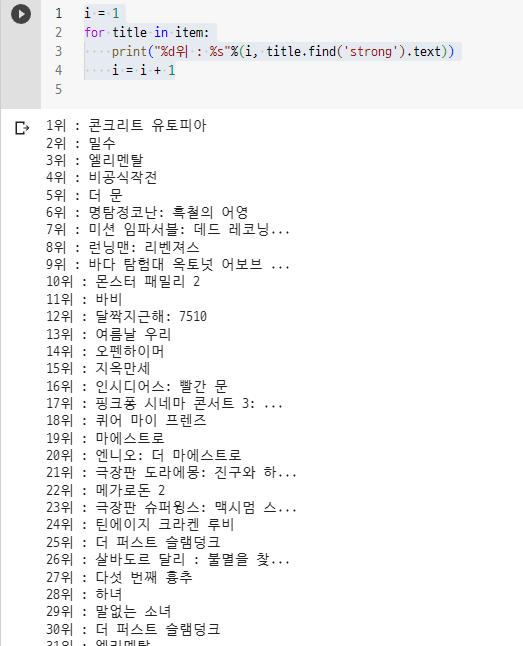
728x90
반응형